
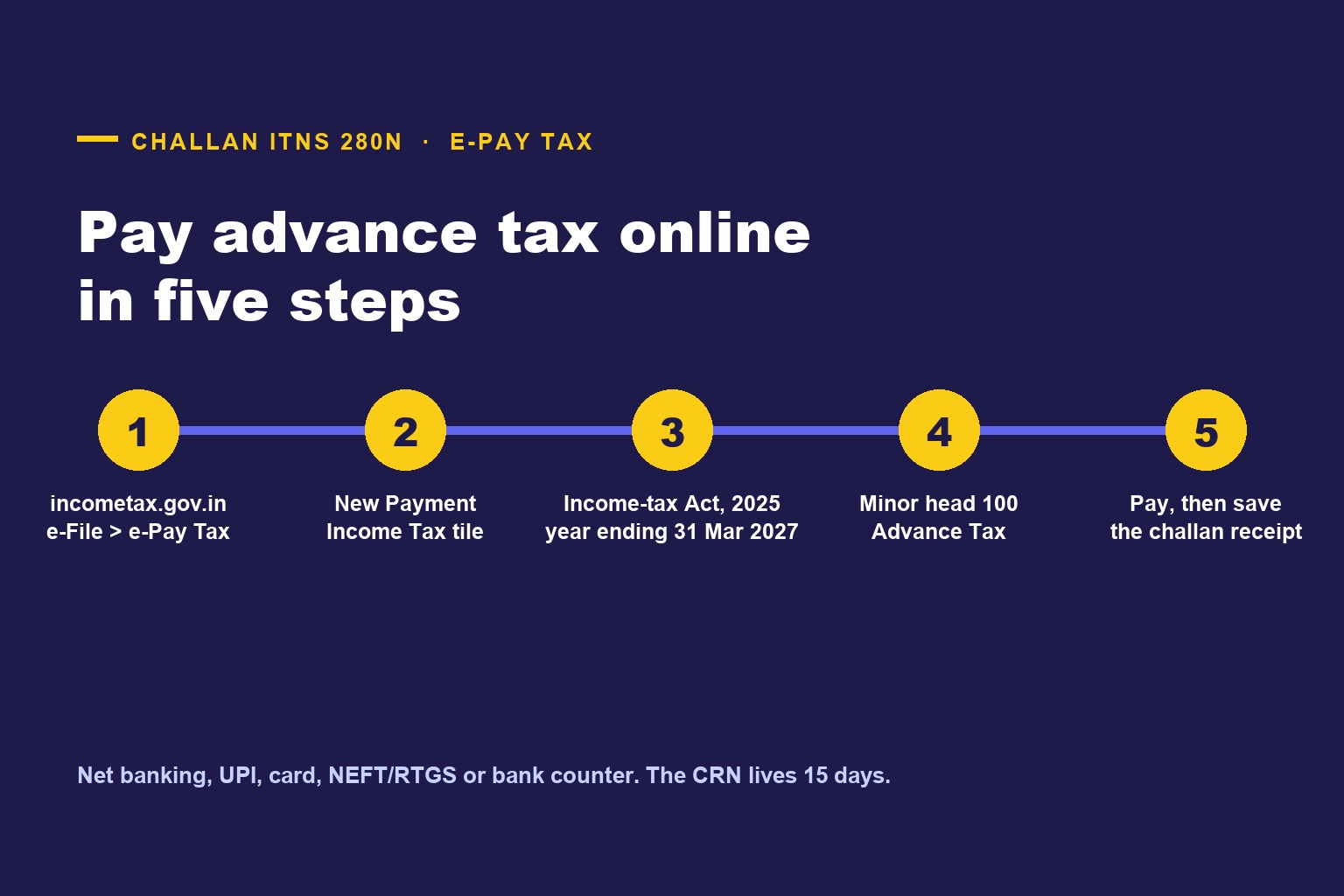

TL;DR: Advance tax is paid on the Income Tax e-Filing portal through e-Pay Tax. For tax year 2026-27 (1 April 2026 to 31 March 2027) the portal first asks you to select the Income-tax Act, 2025, and the challan it generates is ITNS 280N, with minor head 100 (Advance Tax). Five screens: log in (or use the pre-login option with PAN and OTP), e-File → e-Pay Tax → New Payment, pick the Income Tax tile, choose the Act and the year and the minor head, enter the amount, choose a payment mode and pay. Save the Challan Receipt; it carries the CIN you will quote in your return. The old ITNS 280 is still on the portal for 1961-Act years, which is exactly what you use for self-assessment tax on the FY 2025-26 return you may be filing this same month. Get the Act right and the rest is easy.
1. Before you start: how much, and by when
Advance tax is due when the tax on your estimated income for the year, after the TDS and TCS you will suffer, is Rs 10,000 or more (Section 404 of the Income-tax Act, 2025). It is paid in four cumulative instalments under Section 408: 15 per cent by 15 June, 45 per cent by 15 September, 75 per cent by 15 December and the whole by 15 March. Presumptive declarants under Sl. No. 1 or 3 of the Section 58(2) table (the business and profession rows, not goods carriage) pay the whole amount by 15 March. Deep’s 15 September 2026 instalment guide has the computation; Vijay’s page on who has to pay and who is exempt has the tests. This page starts once you know the number.
Have ready: your PAN, a mobile number that receives OTPs (for the pre-login route), the amount, and net banking or UPI or a card on a bank that works with the portal.
2. The five steps
Step 1: Open e-Pay Tax
Go to incometax.gov.in. Either log in and go to e-File → e-Pay Tax, or use the e-Pay Tax link under Quick Links on the home page without logging in, where you enter your PAN, confirm it, and verify with an OTP on your mobile. Both routes reach the same service. Logged-in is better if you want the payment to appear in your Payment History and in your pre-filled return.
Step 2: New Payment, then the Income Tax tile
Click New Payment. The page shows tiles for the kinds of payment your PAN can make. Choose Income Tax (Advance Tax, Self-Assessment Tax, etc.) and click Proceed. (Companies see a Corporation Tax tile; the flow is the same.)
Step 3: Select the Act, the year and the minor head
This is the screen that changed in 2026 and the one to slow down on.
- Act: select Income-tax Act, 2025 for any payment relating to tax year 2026-27 onwards. This is what makes the challan ITNS 280N.
- Year: the tax year ending 31 March 2027 for advance tax paid between now and 31 March 2027. Under the 2025 Act the portal uses the tax year, the year in which you earn the income and pay the advance tax, not an assessment year.
- Type of Payment (Minor Head): 100, Advance Tax.
If you are paying self-assessment tax on the FY 2025-26 return, that is the other combination: Income-tax Act, 1961, Assessment Year 2026-27, minor head 300, challan ITNS 280. Two Acts are live on the same portal this September and the only thing that separates them is your selection on this screen.
Step 4: Enter the amount
Enter the advance tax in the Tax field. Surcharge and cess are part of the tax you are estimating; you can enter the total in the tax row or split it across the rows the screen offers. Leave interest and penalty at nil; instalment interest under Section 425, if any, is settled in the return, not in an advance-tax challan. Click Continue.
Step 5: Choose a mode and pay
The portal asks for the payment mode at this point, and it cannot be changed once the challan is generated (you would generate a fresh one).
- Net Banking or Debit Card of an authorised bank, from the list the portal shows at that step (State Bank of India, HDFC Bank, ICICI Bank, Axis Bank, Kotak Mahindra Bank, Punjab National Bank, Bank of Baroda, Canara Bank and Union Bank of India are among them). Payment completes on the bank’s page and returns you to the portal.
- Payment Gateway: net banking, debit card, credit card or UPI through one of the gateway banks the portal offers at the time. This is usually the route when your own bank is not on the authorised list; the portal shows which gateways are live. Gateway charges, if any, are shown before you confirm.
- RTGS / NEFT: the portal generates a mandate form with the beneficiary details; you make the transfer from any bank. The receipt reflects on realisation.
- Pay at Bank Counter: cash (up to Rs 10,000 per challan), cheque or demand draft at a branch of an authorised bank against the challan printout. Not available to a company, or to anyone to whom the tax-audit provision (Section 44AB of the 1961 Act) applies, under CBDT Notification 34/2008.
Review the summary, click Pay Now, accept the terms, and complete the payment. The portal then shows the Challan Receipt: download it. It carries the CIN (Challan Identification Number), the BSR code of the bank and the date of payment, which the return asks for in the advance-tax schedule. Under Payment History the status shows PAID.
3. The CRN, and why 15 days matters
Every challan you generate gets a Challan Reference Number (CRN), and payment must be initiated against that CRN. A CRN is valid for 15 days from generation; if no payment is initiated in that time it expires and you generate a new one. There is one exception written for advance tax: a CRN generated on or after 16 March for advance tax is valid until 31 March of that financial year, so a last-week-of-March challan does not expire mid-way. A cheque presented at a bank counter on or before the valid-till date extends the challan’s validity by 90 days. Saved drafts, before a CRN is generated, stay editable for 15 days; expired challans stay visible under Generated Challans for 30 days.
For a 15 September instalment, this means: generating the challan on 12 September and paying on 15 September is fine, and generating it on 15 September and paying on 16 September is a missed instalment. The date that counts for Section 425 is the date of payment, not the date of the challan.
4. Checking the payment landed
- Payment History under e-Pay Tax shows every challan with its status; PAID means the bank confirmed it.
- Reconcile the Challan Receipt with the AIS / Form 26AS once the payment appears there. Najma’s piece on Form 26AS, AIS and TIS explains where to look.
- In the return for tax year 2026-27, check the advance-tax schedule against your receipts; if a payment is missing, enter it from the receipt (BSR code, date, CIN, amount).
5. Fixing a wrong challan
The mistakes that recur:
- Wrong Act. You selected the Income-tax Act, 1961 and AY 2026-27 (challan ITNS 280) for what was meant to be the tax year 2026-27 instalment. That payment is for a different year and does not count for Section 425. The portal has a Challan Correction request (log in, then Services → Challan Correction) for correcting the year, the major head and the minor head of an unconsumed challan, within the short time windows stated on that page; use it promptly. Meanwhile the correct instalment is still due, so pay it on the right Act as well if the date is close.
- Wrong minor head. Self-assessment (300) instead of advance tax (100). Same correction route, and do it: a challan under minor head 300 is self-assessment tax, not advance tax, so do not count on it for the Section 424 test until it is corrected.
- Paid twice. The excess comes back as a refund with the return; there is no separate refund of a challan.
- Bank debited, portal says not initiated. Wait for the bank’s confirmation before paying again; check Payment History after a few hours and the bank statement for a reversal.
6. Quick answers
Which challan for the 15 September 2026 instalment? ITNS 280N: Income-tax Act, 2025, year ending 31 March 2027, minor head 100.
Which challan for tax on the FY 2025-26 return I am filing now? ITNS 280: Income-tax Act, 1961, AY 2026-27, minor head 300.
Can I pay by UPI? Yes, through the Payment Gateway mode.
Can I pay cash at a bank? Pay at Bank Counter, at an authorised bank, cash up to Rs 10,000 per challan, unless you are a company or a tax-audit case.
Do I need to log in? No; the pre-login e-Pay Tax route works with PAN and OTP. Logging in is better for records.
I generated a challan and did not pay. Anything to do? Nothing; it expires after 15 days. Generate a fresh one when you pay.
Is there a separate challan for capital gains? No. Advance tax is one amount, computed to include the tax on the gain; Deep’s piece on advance tax on capital gains explains the timing.
Sources
- Income Tax Department e-Filing portal — e-Pay Tax FAQs; Generate Challan Form (CRN) user manual; Create Challan through PAN Login; Tax Payment Modes under e-Pay Tax (challan ITNS 280N under the Income-tax Act, 2025; ITNS 280 under the Income-tax Act, 1961).
- Income-tax Act, 2025 — Sections 404, 405, 408, 424, 425.
- CBDT Notification No. 34/2008 (as cited in the portal FAQs on the Pay at Bank Counter restriction).
Written as at 10 September 2026 from the e-Filing portal’s help pages. Screen labels change from time to time; the Act, year and minor head are the fields that matter. Take advice from a Chartered Accountant on the amount itself.


Comments (0)
No comments yet. Be the first to comment!