
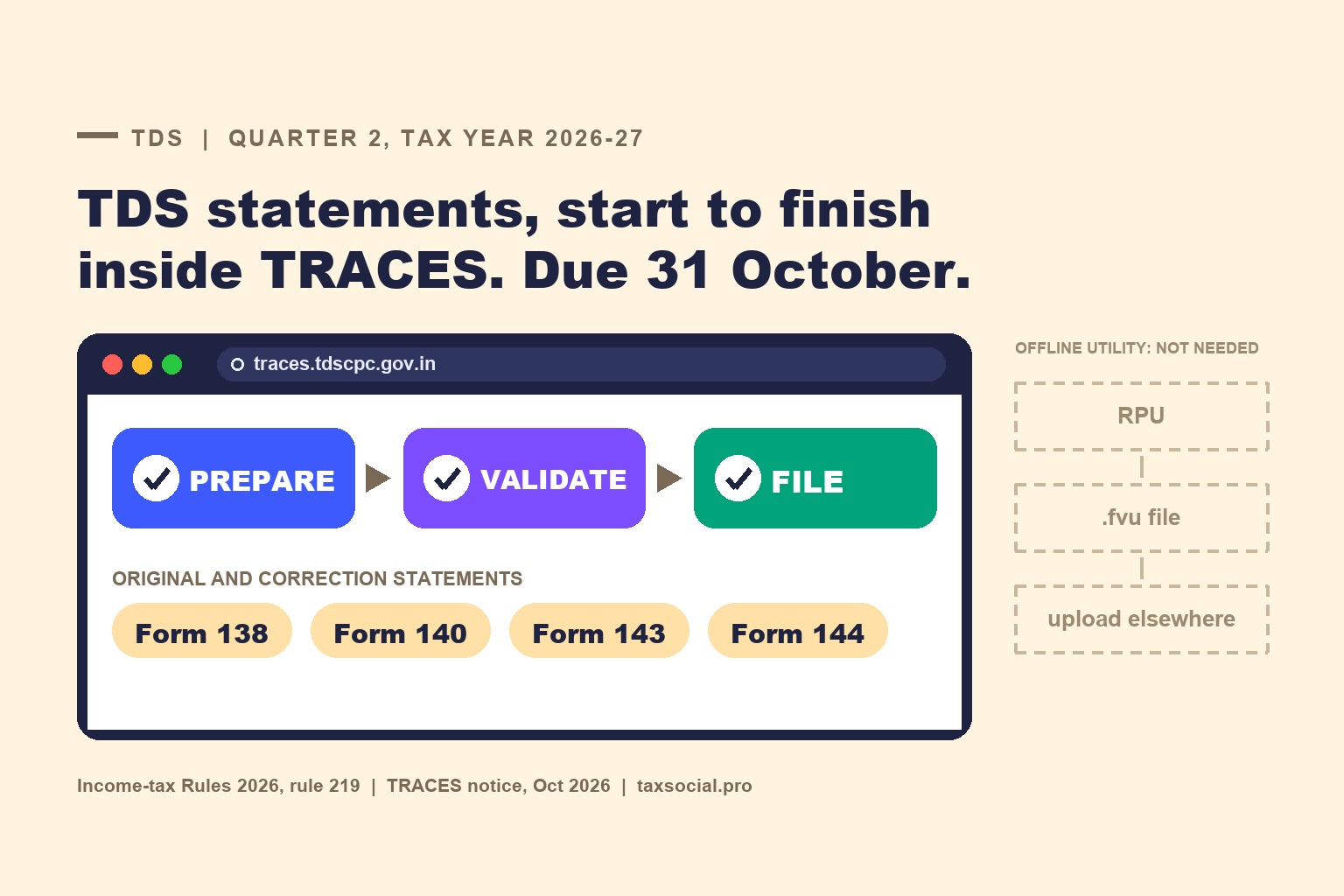

Yes, it is real. The TRACES home page now carries the notice: "Original TDS/TCS statement filing for Quarter 2 Tax Year 2026-27 is enabled now". A deductor can prepare, validate and file the quarterly statement inside TRACES, in Forms 138, 140, 143 and 144, without the offline utility. Correction statements in the same four forms can also be filed there. The due date has not moved: under rule 219(4) of the Income-tax Rules, 2026, the July-September quarter is due by 31 October 2026. Two claims going round on social media are not supported by anything the department has published. First, that the old route has closed: the e-filing portal's own user manuals still describe uploading a .fvu file, and TIN facilitation centres still accept statements. Second, that TRACES is just a new place to upload the .fvu file: the official wording is about preparing the statement online, which goes further than that.
1. What the department has actually said
There is no CBDT notification or circular behind this. The announcement is on the TRACES portal itself (traces.tdscpc.gov.in), in two places, as at 6 October 2026.
The home-page banner reads "Original TDS/TCS statement filing for Quarter 2 Tax Year 2026-27 is enabled now", then: "Online Original TDS/TCS statement filing is now available. Prepare, validate and file TDS/TCS statements for Quarter 2 of Tax Year 2026-27 easily and conveniently online." It lists four benefits: filing directly through TRACES, "No Offline Utility Required", data entry and validation within the portal, and faster filing.
The news ticker adds: "The online functionality for filing original as well as correction statements in Form Nos. 138, 140, 143, and 144 has been made available on the TRACES portal. Users may utilise the facility for filing the respective statements."
Three other ticker items matter to anyone filing for 2026-27:
- Challan correction for Tax Year 2026-27 is now on TRACES. For years up to FY 2025-26 you go through the separate "Compliance under Income-tax Act, 1961" menu.
- TDS certificates, default summaries, justification reports, consolidated files and PAN error reports for Tax Year 2026-27 can be downloaded under Downloads.
- Correction of Form 141 (the challan-cum-statement for property, rent and similar one-off deductions) is live for Schedules A, B, C and D (Cash), with D (Kind) to follow.
Why can a portal notice do this without a rule change? Rule 219(1) only says statements are delivered "to the Director General of Income-tax (Systems) or the person authorised by him". Where and how they are taken in is left to the systems directorate.
2. What was the old route?
Until now a quarterly statement went through the same steps every quarter. You prepared it in the Return Preparation Utility (RPU) or in commercial software that writes the same file format. You ran it through the File Validation Utility (FVU), which produces a .fvu file. You uploaded that file on the income-tax e-filing portal under the TAN login, or handed it in at a TIN facilitation centre. TRACES only came in later, for processing, defaults, Form 16/16A and corrections. So the deductor dealt with two or three systems for one statement.
What is new is that the whole statement can now begin and end on TRACES. You key it in or bulk-load it, the portal validates it, you e-verify it, and the statement is filed in the same system that will process it and issue the certificates.
3. The four forms, and who goes in which
For Tax Year 2026-27 onwards, the quarterly statements are the forms prescribed by the table in rule 219(1). Forms 24Q, 26Q, 27Q and 27EQ remain the forms for FY 2025-26 and earlier periods:
| Form | Replaces | What goes in it (rule 219 table) |
|---|---|---|
| 138 | 24Q | Salary TDS under section 392, and tax a specified bank deducts on the income of a specified senior citizen under section 393(1) [Table: Sl. No. 8(iii)] |
| 140 | 26Q | Non-salary TDS under section 393(1) (other than the senior-citizen item above), plus deductions under sections 392(7) and 393(3) for deductees not covered by Form 144 |
| 144 | 27Q | Deductions under sections 392(7), 393(2) and 393(3) where the deductee is a non-resident (other than a company), a foreign company, or a resident but not ordinarily resident |
| 143 | 27EQ | Tax collected at source under section 394(1) |
The third row is easy to misread. Most summaries call Form 144 the "non-resident" statement, but the rule chooses the form by the section under which tax is deducted and the deductee's status together, not by status alone. Section 393(2) payments to non-residents go in Form 144. A resident but not ordinarily resident (RNOR) deductee is named in the Form 144 row too, but only for deductions under sections 392(7), 393(2) and 393(3). Ordinary rent or professional fees paid to an RNOR, deducted under section 393(1), stay in Form 140. The online route does not change any of this. It only changes where you enter the payment.
Two statements are outside this announcement. Form 141 is the challan-cum-statement for property purchases, rent by individuals and similar one-off deductions, due within 30 days from the end of the month of deduction under rule 219(5), and TRACES already handles its corrections. From 1 October 2026 it also has a Schedule E: a resident individual or HUF buying immovable property from a non-resident now reports that deduction in Form 141 without a TAN, not in Form 144 (see our article on that change). Form 142 is a narrow case under rule 219(2): it is filed only by a virtual digital asset exchange that has agreed, under guidelines issued under section 400(2), to pay the tax on a transfer of its own asset instead of the buyer deducting it. For the full old-to-new mapping, see our form mapping article.
4. The deadline is unchanged
Rule 219(4) fixes the due dates by the quarter-end:
| Quarter ending | Due date |
|---|---|
| 30 June 2026 | 31 July 2026 |
| 30 September 2026 | 31 October 2026 |
| 31 December 2026 | 31 January 2027 |
| 31 March 2027 | 31 May 2027 |
A new portal does not extend anything. A late statement still attracts the late-filing fee and the penalty provisions carried into the 2025 Act, whichever route you file it through. Do not leave the first online attempt to 30 October: you will be learning a new screen in the last week of a quarter, while the tax audit deadline also falls in October this year.
5. How the online route works
The filing screens are behind the TAN login, and the department has not yet published a user manual for them. The steps below are from practitioner walkthroughs of the live screens (Quicko's Form 140 guide is the most detailed). Treat the menu names as indicative:
- Log in to TRACES as a deductor with the TAN-based user ID. If your office has only ever used the e-filing portal, register the TAN on TRACES first. The registration guide is under the Deductor menu.
- Go to e-file & View → File TDS/TCS Forms & Statements. Pick the form card (138, 140, 143 or 144), Tax Year 2026-27, Quarter Q2, filing type Regular, and the "Prepare & File Online" option.
- Import challans. The portal lists challans already paid against the TAN that have not been used, and you pick them. This is the most useful part: a challan that does not appear has a problem (wrong TAN, wrong minor head, wrong year) that you want to know about before filing, not after.
- Add deductee rows, one at a time or in bulk through a CSV template.
- Map each deductee row to its challan, then validate. The checks the FVU used to run on your desktop now run on the portal.
- E-verify and submit. The walkthroughs show Aadhaar OTP and DSC. Use whichever the screen offers for the responsible person on your TAN profile, and keep the acknowledgement.
Does TRACES also accept a .fvu file made in the RPU? The infographic going round says that is how it works. The department's banner confirms there is a route that needs no offline utility, but it does not say whether TRACES also takes a .fvu upload, and we could not see that from outside the login. If your payroll or accounting software only produces a .fvu file, you do not need to work it out under deadline pressure: the e-filing portal still takes that file (next section).
6. What is not confirmed
- That the e-filing portal or TIN-FC route has closed. It has not. Nothing on TRACES says the existing route is withdrawn, and the e-filing portal's user manuals for Forms 138, 140 and 144 still describe the old steps: go to e-File, then Income Tax Forms, then File Income Tax Forms; choose the form, tax year, quarter and Regular or Correction; then upload the zip file containing the .fvu file and e-verify. Protean still lists TIN facilitation centres and publishes the Tax Year 2026-27 file formats. The announcement adds a way to file; it does not take one away. If the department switches the old route off, it will have to say so, and we will update this article.
- That the old route took "24-48 hours" to reach TRACES. Processing times were never published. The real benefit of filing where the statement is processed is simpler: there is no hand-off between systems to go wrong.
- That this covers earlier years. The announcement is for Tax Year 2026-27, starting with Q2. Statements and corrections for 1961-Act periods (up to FY 2025-26) still sit in their own part of the portal, and challan correction for those years is expressly routed through the "Compliance under Income-tax Act, 1961" menu.
- Q1 of 2026-27. The banner speaks of Quarter 2. Q1 statements were due by 31 July. The ticker says the facility covers "original as well as correction statements", so a Q1 correction may be fileable online, but check on the screen before relying on it.
7. What to do this month
- Check that every TAN you file for is registered on TRACES, and that the responsible person's details and DSC are current on its profile. A missing registration is the most common reason the online route will not open.
- Before keying a statement, check your challans in the import list. If a challan is missing, fix it first. Challan correction for 2026-27 is now on TRACES itself.
- Check each payee is in the right form. The rule 219 table decides by section and status together, so check the section each deduction was made under, not just whether the payee lives abroad. A property bought from an NRI by an individual or HUF since 1 October goes in Form 141 Schedule E, not Form 144.
- Try the online route on a small TAN first. Keep the RPU/FVU route ready as a fallback for the large ones until you have filed at least one statement end to end.
- Be careful with emails about "TRACES 2.0". The portal's own ticker warns that official CPC (TDS) mail comes only from the @tdscpc.gov.in domain, and never asks for passwords or OTPs.
Sources
- TRACES portal (traces.tdscpc.gov.in), home-page banner and news ticker, as read on 6 October 2026.
- Income-tax Rules, 2026, rule 219 (sub-rules (1), (2), (4) and (5)) and the headings of Form Nos. 138, 140, 143 and 144; Notification No. 121/2026 (Form 141 Schedule E, from 1 October 2026).
- Income-tax e-filing portal, user manuals for Forms 138, 140 and 144 (the .fvu upload route).
- Practitioner walkthrough of the online Form 140 flow (Quicko), used only for the click-path in section 5.



Comments (0)
No comments yet. Be the first to comment!