
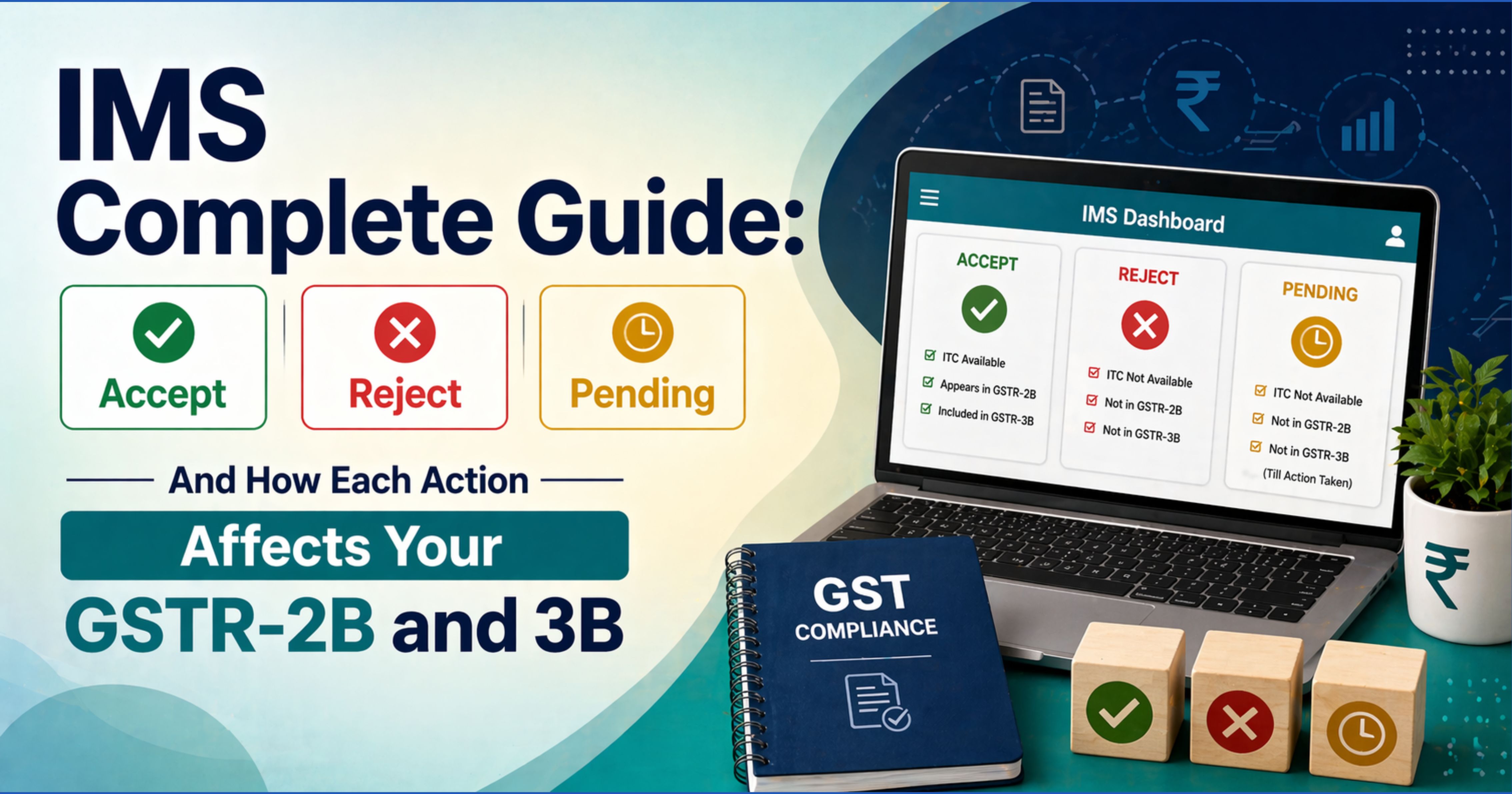

What IMS Is and Why It Was Introduced
The Invoice Management System (IMS) is a module on the GST portal that lets recipients review every inbound invoice, credit note, and amendment from their suppliers before GSTR-2B is generated for the period. It went live on 1 October 2024 (applicable from the October 2024 tax period onward).
Before IMS, the buyer had no say in what landed in their GSTR-2B - if the supplier filed an invoice in GSTR-1, it flowed automatically into the buyer's 2B, whether accurate or not. IMS inserts a review step between supplier GSTR-1 filing and buyer GSTR-2B generation, giving the buyer three action choices.
IMS shifts ITC control partially back to the recipient - but only if actively used.
The Three IMS Actions
Each record that shows up on your IMS dashboard - invoice, credit note, or amendment — can receive one of the following actions:
1. Accept
The record is accepted as correct. It flows into your next GSTR-2B and is eligible for ITC (subject to Section 16 conditions).
Use Accept when: the invoice matches your purchase records, the tax amount is correct, and the supply is genuine.
2. Reject
The record is rejected. It is generally prevented from flowing into your GSTR-2B, subject to portal processing and reconciliation. No ITC can be claimed against a rejected record.
Use Reject when: the invoice is not yours (wrong GSTIN by supplier), the supply never happened, the values are materially incorrect, or you have legitimate reasons to refuse credit.
Once rejected, the supplier is notified and may amend or re-file. Your action can be reversed before 2B generation.
3. Pending
The record is deferred. It does not flow into the current month's GSTR-2B. It remains on your IMS dashboard in subsequent months until you take a final action (Accept or Reject) or until the maximum permitted time lapses.
Use Pending when: you need time to reconcile against purchase records, the goods/services have not yet been received, or you are awaiting supporting documents.
Pending comes with time limits tied to Section 16(4) of the CGST Act. If not acted upon within the Section 16(4) time limit (currently 30 November of the next financial year, or the annual return filing, whichever is earlier), the ITC may become time-barred.
Default Behaviour — No Action
If you take no action on a record before GSTR-2B is generated:
- Invoices and debit notes are generally treated as accepted by default under the system behaviour and flow into 2B
- Credit notes are similarly treated as accepted and reduce your ITC accordingly
The default is risk-adverse for the exchequer — silence equals acceptance. Practitioners who ignore IMS do not "freeze" their 2B; they simply let it populate automatically.
Credit Notes — A Special Case
Credit notes on IMS have a different rule set:
- Credit notes are typically restricted to Accept or Reject actions (as per current portal design) — the Pending option is generally not available for them
- Accepting a credit note reduces the ITC previously claimed
- Rejecting a credit note keeps the earlier ITC intact, but the supplier's tax liability is not automatically reduced — this can trigger reconciliation disputes
Handle credit notes carefully: a rejected credit note may look benign in the short run but creates a supplier-buyer mismatch that shows up in later reconciliations.
How Each Action Flows to GSTR-2B
IMS Action Invoice / Debit Note Credit Note Accept Flows into 2B → eligible for ITC Reduces 2B ITC Reject Generally blocked from 2B (subject to portal processing) Does not reduce 2B ITC (mismatch risk) Pending Not in current 2B; carried forward Not typically available No action Generally treated as accepted Generally treated as accepted
How GSTR-2B Feeds Into GSTR-3B Auto-Population
Once GSTR-2B is generated (typically around the 14th of each month), it auto-populates the relevant ITC tables in GSTR-3B (such as Table 4A) based on GSTR-2B. The auto-populated figure reflects what is in your 2B, which in turn reflects your IMS actions.
- Manual overrides of the auto-populated values may be flagged by the system and can attract scrutiny during audit
- The system prompts a justification when overrides are applied
- Consistent, defensible reconciliation is the practitioner's best protection
The IMS Timing Window
Event Approximate Date Supplier GSTR-1 filing due 11th of following month IMS action window opens As supplier records appear GSTR-2B generated Typically around the 14th 2B locks for the month After 14th (with recompute option) GSTR-3B filing due 20th (or 22nd/24th for quarterly)
Action taken after 2B generation but before 3B filing requires a manual 2B recompute on the portal, which delays 3B filing.
Common Mistakes Practitioners Are Making
- Ignoring the IMS dashboard entirely — assuming 2B will "just work" is the most common error. Default behaviour is acceptance of everything, including garbage invoices from compromised supplier credentials.
- Using Pending as a dumping ground — unused Pending entries quietly time-bar under Section 16(4). Review Pending records monthly.
- Rejecting credit notes carelessly — the supplier's tax liability does not automatically drop. This creates mismatches that surface at annual reconciliation (GSTR-9 / 9C).
- Not coordinating with the accounts team — accounts books must match 2B, not the other way around. IMS actions should be decided after matching the supplier record against purchase register entries.
- Forgetting amendments — supplier-side amendments also land in IMS and require their own action.
- Treating IMS as a one-off task — IMS logs can become part of the audit trail; consistent action patterns matter.
Where to Find IMS on the Portal
GST Portal → Returns Dashboard → Select Period → Invoice Management System (IMS)
The dashboard shows all pending records grouped by supplier. Filters allow action by vendor, date, or document type. Bulk actions are supported via the offline utility (see the separate IMS Offline Utility v1.0 guide).
Practical Workflow — Monthly IMS Checklist
- Between the 1st and 10th of the month, verify that supplier GSTR-1 data is complete on your dashboard
- Between the 11th and 13th, take Accept / Reject / Pending actions on each record
- On or after the 14th, let GSTR-2B generate, then auto-populate GSTR-3B
- Reconcile any Pending records before the Section 16(4) cut-off
- Handle credit notes the same month they appear - do not defer
Bottom Line
IMS is the first point in the ITC flow where you, the buyer, have control. Skip it, and the portal makes your decisions for you - mostly in favour of acceptance. Use it monthly, and you walk into every GST audit with a clean, defensible reconciliation. The rest of your 2B-3B discipline rides on whether your IMS inbox is empty on the 14th.



Comments (0)
No comments yet. Be the first to comment!